现状:对于字典值,大部分情况下,前端需要展示中文名称,后端数据库中存储的是 code 或者 value 值,会造成两个问题:

  1. 在后端代码中需要定义大量的 Contant 来解决 magic number 问题,较为难以维护
  2. 在传递给前端时,对于列表接口需要自定义 Json 序列化处理成中文名称(label),但是对于详情接口又不需要处理

目标

  1. 在代码中能够更好的维护字典值,保证代码的可读性
  2. 能够传递给前端 label 方便展示
  3. 从数据库中存储和查询的时候还是 value 值,不需要额外处理

解决方案:

  1. 定义枚举值对应数据库中的字典,例如
1
2
3
4
5
6
7
8
9
10
11
12
13
14
15
16
17
18
19
20
21
22
23
24
25
26
27
28
29
30
31
32
33
34
35
import com.baomidou.mybatisplus.annotation.EnumValue;
import com.fasterxml.jackson.annotation.JsonCreator;
import com.fasterxml.jackson.annotation.JsonValue;

public enum FileSourceType {
UPLOADED("1", "fileSourceType", "上传"),
LINK_COMMON("2", "fileSourceType", "引用文件");

@EnumValue
//用于mybatis-plus将数据库中的值存入
private String value;
private String type;
@JsonValue
//用于传递给前端时json处理
private String label;

FileSourceType(String value, String type, String label) {
this.value = value;
this.type = type;
this.label = label;
}
//...getter setter....

//用于接受前端传递过来的value值,自动成枚举。
@JsonCreator
public static FileSourceType getEnum(String value) {
for (FileSourceType type : FileSourceType.values()) {
if (type.getValue().equals(value)) {
return type;
}
}
return null;
}

}
  1. 配置 Java Bean
1
2
3
4
5
6
7
8
9
10


public class FileDomain extends BaseEntity {
//....

//直接使用枚举作为成员
private FileSourceType sourceType;
//...

}
  1. 全局配置
  • Json 序列化配置
1
2
3
4
5
@Bean
public Jackson2ObjectMapperBuilderCustomizer jacksonObjectMapperCustomization() {
return builder -> builder
.featuresToEnable(SerializationFeature.WRITE_ENUMS_USING_TO_STRING);
}
  • Mybatis-plus 配置
1
2
3
mybatis-plus:
configuration:
default-enum-type-handler: com.baomidou.mybatisplus.core.handlers.MybatisEnumTypeHandler

效果

  1. 返回的数据会自动根据枚举中的@JsonValue 注解或者 toString 方法进行处理。
  2. 数据库中存储的值没有变化,还是 value 值。
  3. 前端传递过来的 object 中包含枚举的 value,可以自动转换成 enum。
  4. 在代码中设置值或者校验值更容易了,比如:
1
2
//可读性较好
commonFile.setSourceType(FileSourceType.LINK_COMMON);

缺点
对于前端需要使用下拉框回显的时候,需要额外创建一个 VO 来处理,此时需要 copyBean 将 enmu 获取到 value 返回。

refer: Mybatis-plus 官方介绍
分支管理

master/main 分支为开发稳定分支,用来合并多人的请求,可以稳定部署在 dev 环境中,需要提交 merge request 进行合并分支,同时应当组织 code review;
feature-/dev- 这类分支为开发分支,从 master checkout 出来,在部署 dev 环境之前,建议 merge master 到自己开发分支,本地自测,保证不影响其他人开发。模块功能开发完成后应该合并进 master 分支中。
release 分支 制品仓库中所有制品应该来源于 release 仓库,在 master 测试过,bug 修改完成后,合并进 release 分支。对于 master 后续小的修改或者进 master 没有 review 的需要进行 review,并且只有部分人员有 merge 权限。可以直接部署到线上环境中。
hotfix-yyyymmdd 分支 线上环境紧急 bug 修复版本,分支从 release 或者 tag 中 checkout 出来,进行的修改需要同步 merge 进入 master/release 分支。master 分支使用 cherrypick 从 hotfix 中拿取指定的 commit。

tag: 对于每次版本发布进行 tag 标记,merge 进 release 时,应当自动 tag,记录为版本号

阅读全文 »

添加 sysctl 参数

fs 参数

1
2
3
4
5
6
7
8
cat > /etc/sysctl.d/99-fs.conf <<EOF
# 最大文件句柄数
fs.file-max=1048576
# 最大文件打开数
fs.nr_open=1048576
# 同一时间异步IO请求数
fs.aio-max-nr=1048576
EOF

vm 参数

1
2
3
4
5
6
7
8
9
10
cat > /etc/sysctl.d/99-vm.conf <<EOF
# 内存耗尽才使用swap分区
vm.swappiness=10
# 当内存耗尽时,内核会触发OOM killer根据oom_score杀掉最耗内存的进程
vm.panic_on_oom=0
# 允许overcommit
vm.overcommit_memory=1
# 定义了进程能拥有的最多内存区域,默认65536
vm.max_map_count=262144
EOF
阅读全文 »

前提

  1. 域名被cloudflare管理
  2. docker环境

使用docker申请

  1. Cloud Flare上去获取Global API Key;并写入到cloudflare.ini配置文件中去

    1
    2
    3
    4
    mkdir certbot

    echo "dns_cloudflare_email = [email protected]
    dns_cloudflare_api_key = cf-global-token" > certbot/cloudflare.ini
  2. 申请证书

    1
    2
    3
    4
    5
    6
    7
    8
    9
    10
    11
    12
    13
    docker run -it --rm --name certbot \
    -v ./certbot/etc:/etc/letsencrypt \
    -v ./certbot/lib:/var/lib/letsencrypt \
    -v ./certbot:/.secrets \
    certbot/dns-cloudflare certonly \
    --non-interactive \
    --dns-cloudflare \
    --dns-cloudflare-credentials /.secrets/cloudflare.ini \
    --dns-cloudflare-propagation-seconds 60 \
    -m [email protected] \
    --agree-tos \
    --no-eff-email \
    -d '*.your.domain'
  3. renew证书

    1
    2
    3
    4
    5
    docker run -it --rm --name certbot \
    -v "./certbot/etc:/etc/letsencrypt" \
    -v "./certbot/cloudflare.ini:/cloudflare.ini" \
    certbot/dns-cloudflare renew \
    --dns-cloudflare --dns-cloudflare-credentials /cloudflare.ini

Java 线上问题排查经验集合

high cpu

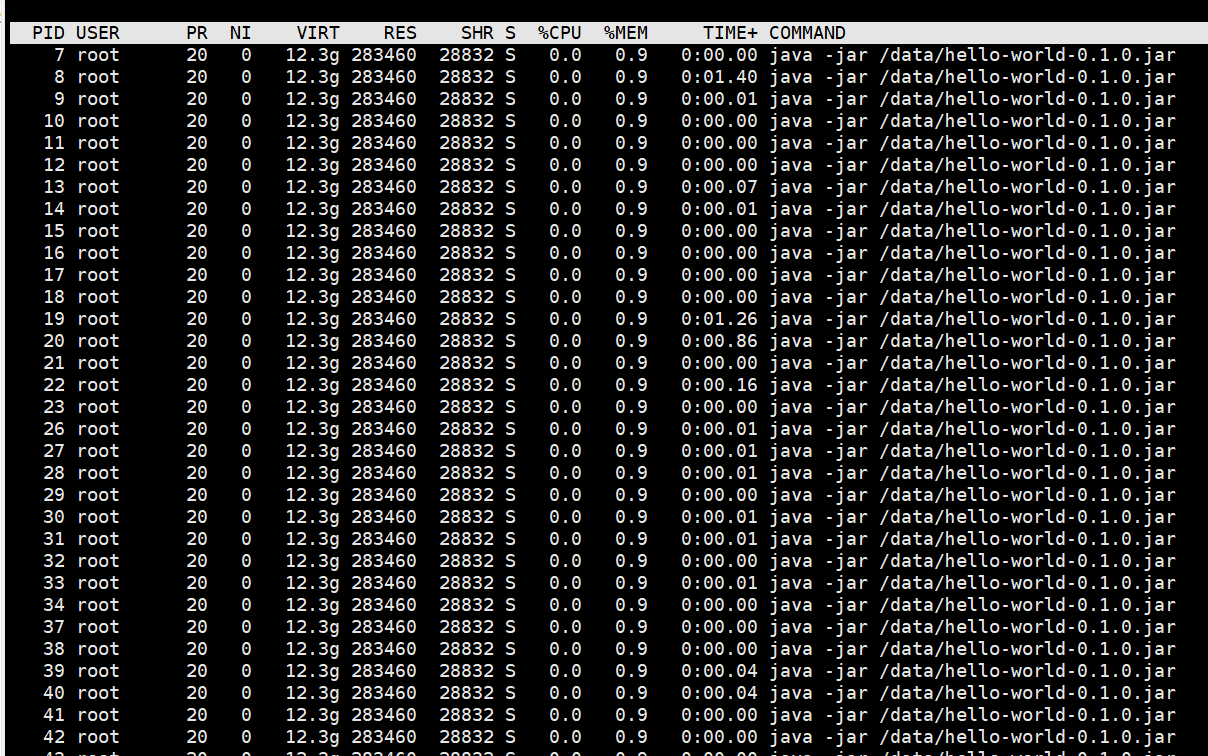
  1. 使用 Top -H 查看 CPU 占用较高的线程 ID。如:
    top-H
1
2
3
4
5
6
7
jps -l # find the right process ,if pid is 1
top -H -p 1 # find the top thread CPU usage in this process. different linux commond may different.
jstack 1 > stack.log # get current java thread info ,save to stack.log file
#if the CPU usage top 1 is 7
printf %x 7 # get the 16 hexadecimal value of thread id
#find the thread info from stack.log, can use vim or other commond to find.
grep "0x7" -A 10 stack.log
  1. 获得了 thread info 后,当然这里也可以通过其他方式获取线程栈信息,比如 show-busy-java-threadsarthas thread,可以分析堆栈信息,比如:
1
2
3
4
5
6
7
8
9
10
11
12
13
14
15
16
17
"http-nio-8080-exec-2" #20 daemon prio=5 os_prio=0 cpu=0.90ms elapsed=155.86s tid=0x00001465ecfb8800 nid=0x2b waiting on condition  [0x00001465ac2c4000]
java.lang.Thread.State: TIMED_WAITING (sleeping)
at java.lang.Thread.sleep([email protected]/Native Method)
at com.dockerforjavadevelopers.hello.HelloController.index(HelloController.java:12)
at jdk.internal.reflect.NativeMethodAccessorImpl.invoke0([email protected]/Native Method)
at jdk.internal.reflect.NativeMethodAccessorImpl.invoke([email protected]/NativeMethodAccessorImpl.java:62)
at jdk.internal.reflect.DelegatingMethodAccessorImpl.invoke([email protected]/DelegatingMethodAccessorImpl.java:43)
at java.lang.reflect.Method.invoke([email protected]/Method.java:566)
....
at org.apache.coyote.AbstractProtocol$ConnectionHandler.process(AbstractProtocol.java:889)
at org.apache.tomcat.util.net.NioEndpoint$SocketProcessor.doRun(NioEndpoint.java:1743)
at org.apache.tomcat.util.net.SocketProcessorBase.run(SocketProcessorBase.java:49)
- locked <0x000000062aa88668> (a org.apache.tomcat.util.net.NioEndpoint$NioSocketWrapper)
at org.apache.tomcat.util.threads.ThreadPoolExecutor.runWorker(ThreadPoolExecutor.java:1191)
at org.apache.tomcat.util.threads.ThreadPoolExecutor$Worker.run(ThreadPoolExecutor.java:659)
at org.apache.tomcat.util.threads.TaskThread$WrappingRunnable.run(TaskThread.java:61)
at java.lang.Thread.run([email protected]/Thread.java:829)

线程停留在了,java.lang.Thread.sleep([email protected]/Native Method) 我们需要在线程栈中找到自己业务的信息,这个示例为
com.dockerforjavadevelopers.hello.HelloController.index(HelloController.java:12),同时通过这个信息我们知道当前线程状态为:TIMED_WAITING,其实并不会消耗 cpu(为示例使用的 Thread.sleep, 通常这一步会找到占用 cpu 时间超长的 thread)

阅读全文 »

PlatformTransactionManager&TransactionAwareCacheDecorator 源码解析+问题排查

1.问题现象

在原有使用中发现原有删除缓存的操作未能正常执行。原code 如下:
1
2
3
4
5
6
7
8
9
10
11
12
13
@Transactional
void function{
db_action();
db_action2();
//在上方事务提交后,进行缓存和通知其他service动作
TransactionSynchronizationManager.registerSynchronization(new TransactionSynchronizationAdapter() {
@Override
public void afterCommit() {
deleteCache();
action2();
}
})
}

排查思路:
1.确认afterCommit 是否被调用
发现被调用,但是查看缓存后没有被执行
2. 了解afterCommit如何被处理
3. 尝试debug transactionManager 执行部分Code,确定整体流程

阅读全文 »

Git设置代理

1
2
3
4
5
6
7
8
9
10
11
12
13
14
15
16
17
设置:
git config --global https.proxy http://127.0.0.1:1080
git config --global https.proxy https://127.0.0.1:1080
或者:
git config --global http.proxy 'socks5://127.0.0.1:1080'
git config --global https.proxy 'socks5://127.0.0.1:1080'

取消:
git config --global --unset http.proxy

git config --global --unset https.proxy

特殊设置:

git config --global http.https://github.com.proxy socks5://127.0.0.1:1080

git config --global --unset http.https://github.com.proxy

Idea设置代理

1
2
File->Settings->Appearance&Behavior->System Settings->HTTP Proxy
socks;localhost;1080

Oracle insert into慢,优化方案选择和测试

Oracle端

  • 默认插入耗时
  • Nologing插入耗时
  • APPEND 不寻址,不去寻找 freelist 中的free block , 直接在table HWM 上面加入数据
  • parallel 并行
  • 临时表+批量插入耗时

    创建测试环境

  1. 表结构:
    1
    2
    3
    4
    5
    6
    7
    8
    9
    10
    11
    12
    13
    14
    15
    16
    17
    18
    19
    20
    21
    22
    23
    24
    25
    26
    27
    28
    29
    30
    31
    32
    33
    34
    35
    36
    37
    38
    39
    40
    -- Create table
    create table LOG_OPERATING
    (
    id VARCHAR2(20) not null,
    type CHAR(1) not null,
    operator VARCHAR2(50) not null,
    operator_id VARCHAR2(50) not null,
    url VARCHAR2(255),
    ip VARCHAR2(65) not null,
    model VARCHAR2(40) not null,
    description VARCHAR2(255) not null,
    time DATE not null,
    is_successful CHAR(1) default 1
    )
    tablespace USERS
    pctfree 10
    initrans 1
    maxtrans 255
    storage
    (
    initial 64K
    next 1M
    minextents 1
    maxextents unlimited
    );
    -- Create/Recreate primary, unique and foreign key constraints
    alter table LOG_OPERATING
    add constraint PK_LOG_OPERATING primary key (ID)
    using index
    tablespace USERS
    pctfree 10
    initrans 2
    maxtrans 255
    storage
    (
    initial 64K
    next 1M
    minextents 1
    maxextents unlimited
    );
  2. Oracle版本
    1
    2
    3
    4
    5
    6
    7
    8
    SQL>select * from v$version;
    BANNER
    ---------------------------------------------------------------------
    Oracle Database 11g Enterprise Edition Release 11.2.0.1.0 - 64bit Production
    PL/SQL Release 11.2.0.1.0 - Production
    CORE 11.2.0.1.0 Production
    TNS for Linux: Version 11.2.0.1.0 - Production
    NLSRTL Version 11.2.0.1.0 - Production

    Insert测试

  3. 默认操作,无任何优化
    1
    2
    3
    4
    5
    6
    7
    8
    9
    10
    11
    12
    13
    14
    15
    16
    17
    18
    19
    20
    21
    22
    23
    24
    25
    26
    27
    28
    29
    declare i int:=1;
    begin
    while i<=1000000 loop
    insert into log_operating
    (id,
    type,
    operator,
    operator_id,
    url,
    ip,
    model,
    description,
    time,
    is_successful)
    values
    (i,
    '1',
    'pki_user',
    '399262438320640000',
    '/v1/common/dict/certApplyType',
    '192.168.1.1',
    '通用方法',
    '获取该类型下的值',
    SYSDATE,
    '1');
    i:=i+1;
    end loop;
    end
    commit;
    耗时:77.298秒

2.添加Nologing

1
2
3
alter table log_operating nologging; 
--insert
alter table log_operating logging;

耗时:68.259秒

3.添加 /*+ append */

1
2
3
4
5
6
7
8
9
10
11
12
13
14
15
16
17
18
19
20
21
22
23
24
25
26
27
28
29
declare i int:=1;
begin
while i<=1000000 loop
insert /*+ append */ into log_operating
(id,
type,
operator,
operator_id,
url,
ip,
model,
description,
time,
is_successful)
values
(i,
'1',
'pki_user',
'399262438320640000',
'/v1/common/dict/certApplyType',
'192.168.1.1',
'通用方法',
'获取该类型下的值',
SYSDATE,
'1');
i:=i+1;
end loop;
end
commit;

耗时:67.258秒

3.NOloging+/*+ append */

1
2
alter table log_operating nologging;
--插入

耗时:68.85秒

4.临时表+NOloging+/*+ append */

1
2
3
4
5
6
7
8
9
10
11
12
13
14
15
16
17
18
19
20
21
22
23
24
25
26
27
28
29
30
31
32
33
34
alter table log_operating nologging;


declare i int:=1;
begin
while i<=1000000 loop
insert into TEMP_LOG_OPERATING
(id,
type,
operator,
operator_id,
url,
ip,
model,
description,
time,
is_successful)
values
(i,
'1',
'pki_user',
'399262438320640000',
'/v1/common/dict/certApplyType',
'192.168.1.1',
'通用方法',
'获取该类型下的值',
SYSDATE,
'1');
i:=i+1;
end loop;
insert /*+ append */ into LOG_OPERATING select * from TEMP_LOG_OPERATING;
truncate table TEMP_LOG_OPERATING;
end
commit;

耗时:54.377秒

5.临时表+NOloging+/*+ append */+parallel

1
2
3
4
5
6
7
8
9
10
11
12
13
14
15
16
17
18
19
20
21
22
23
24
25
26
27
28
29
30
31
32
33
34
alter table TEMP_LOG_OPERATING nologging;
alter table LOG_OPERATING nologging;

declare i int:=1;
begin
while i<=1000000 loop
insert into TEMP_LOG_OPERATING
(id,
type,
operator,
operator_id,
url,
ip,
model,
description,
time,
is_successful)
values
(i,
'1',
'pki_user',
'399262438320640000',
'/v1/common/dict/certApplyType',
'192.168.1.1',
'通用方法',
'获取该类型下的值',
SYSDATE,
'1');
i:=i+1;
end loop;
insert /*+ append parallel(a, 4) nologging */ into LOG_OPERATING select /*+ parallel(b, 4) */ * from TEMP_LOG_OPERATING;
end
commit;
truncate table TEMP_LOG_OPERATING;

耗时:42.173

结论

以上结果可能存在误差,建议使用批量插入+临时表+APPEND+PARELLEL

参考文章:
https://blog.csdn.net/S630730701/article/details/71732405
https://blog.csdn.net/tmaczt/article/details/84134173

基础操作

maven的生命周期操作:
maven clean package install 等,后续可能会补充一下

稍微复杂操作

-DskipTests,不执行测试用例,但编译测试用例类生成相应的class文件至target/test-classes下。

-Dmaven.test.skip=true 不执行测试用例,也不编译测试用例类。

mvn -pl moduleA -am install 多模块项目时,打包指定一个moduleA,会自动打包这个模块所依赖的模块

MySQL 8版本中代码生成时出现无法生成或错误对象信息的问题解决

Flowable代码生成时出现无法创建表,报错表不存在

情况说明:

  1. 数据库中有多个库,并且另一个库中已经有了flowable或activiti相关的表
  2. 配置中已经添加了自动生成表的配置database-schema-update: true

    现象:

    无法创建表,一直报表不存在
    1
    Caused by: java.sql.SQLSyntaxErrorException: Table 'workflow.act_ge_property' doesn't exist

    解决方法:

  3. 在数据库链接后添加配置:nullCatalogMeansCurrent = true
  4. 添加SpringBoot配置-根据自己使用的数据库池:
    1
    spring.datasource.hikari.data-source-properties.nullCatalogMeansCurrent=true
  5. Java代码配置-根据自己使用的数据库池:
    1
    2
    3
    HikariConfig config = new HikariConfig();
    ...
    config.addDataSourceProperty("nullCatalogMeansCurrent", true);

    导致的原因分析

    在MySQL官方更新日志中发现配置修改nullCatalogMeansCurrent从默认为True改成了默认为False,如果你使用DatabaseMetaData.getTables获取所有的表信息,8.0版本驱动将返回所有库的表。
    MySQL Changes in Connection Properties
0%